CHAPTER 9
INSTALLATION AND MAINTENANCE
In addition, TK-MAIL requires the presence of TKWRITER to provide text editing and document printing. If not already present, an additional 53 routines requiring approximately 150,000 bytes of storage for source code will be required.
Of course where compilation is available, additional space will be required for object code.
The TK-MAIL database is kept in a file (global) named ^TKMAIL. The initial size and growth potential of this global is site specific and therefore unpredictable. Its size at any point in time depends on the number of users and the number, type and content of the mail it contains.
TK-MAIL is designed to be as efficient as possible with regard to document storage. No more than one physical copy of any memorandum is ever created, regardless of the number of persons to whom it was sent.
Clearly, however, frequent purging of unnecessary mail should be encouraged by each user to prevent unnecessary disk utilization. In addition, regular monitoring of disk growth by system managers is strongly recommended.
Although TK-MAIL is distributed in program form, it does build and maintain several files. By convention, these files also begin with the letters TKMA . When the installation is completed, the only file that will remain is ^TKMAIL.
In order to begin, invoke the initialization program by executing the following instructions
DO ^TKMAINIT
NOTE: If this is the first time PG&A software has been used on your system, you will first be taken through the Toolkit Initialization which defines operating system and terminal type parameters. Re- fer to Appendix A for more information on the init- ialization process.
The TK-MAIL Initialization screen will be displayed a facsimile of which is shown below.
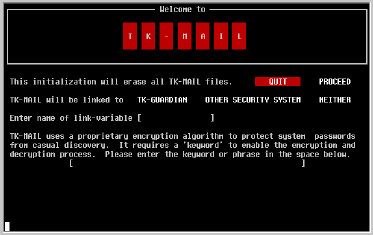
NOTE: The TK-MAIL Initialization Program erases any existing information in the mail file. Proceed to initialization only if it has not yet been run, or you wish to clean it out and begin again.
If you're wondering how to move the highlighted bar, you can use the [SPACE] key, cursor [LEFT] and cursor [RIGHT] keys, or type [P].
If used standalone, TK-MAIL will request each user to identify themselves using a password assigned to them in the user maintenance routines.
Select the type of linkage desired by moving the highlighted bar to the desired selection and press [RETURN].
Enter a keyword or phrase in this field. Only upper case alphabetic characters, numerics, space and punctuation characters will be accepted.
Once initialization has taken place, this keyword cannot be changed, and is therefore not displayed or edited anywhere else in the system.
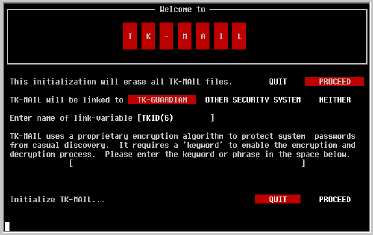
Press P and [RETURN] to build the TK-MAIL database. During the process, the initialization program will display status messages which indicate its progress. The complete procedure should take only a few seconds.
If your system has implemented TK-GUARDIAN and you selected a linkage to it when you initialized TKMAIL, then TK-MAIL will automatically us the user files created and maintained by TK-GUARDIAN. Refer to your TK-GUARDIAN manual for details regarding maintaining user information. The remainder of this section is not for you.
If you have not implemented TK-GUARDIAN, or elected not to interface TK-MAIL to it when you initialized TK-MAIL, then you will need to create and maintain a user file using the utility described in the next several pages.
If you are interfacing TK-MAIL to your own security system, pay special attention to the section which describes the link variable.
All user maintenance is performed using a utility which can be invoked by the following expression:
DO ^TKMAMUWhen invoked, a screen resembling the example shown below will be displayed.
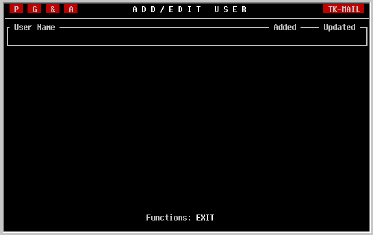
This is the user lookup screen. Your cursor, although not shown in the illustration will be right under user name.
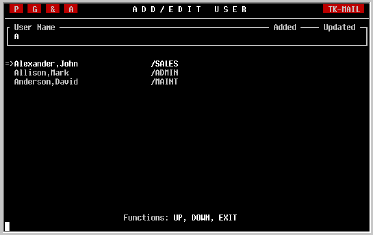
To view a list of all users, type a [*]. No [RETURN] is necessary.
The following sample screen illustrates how this will look.
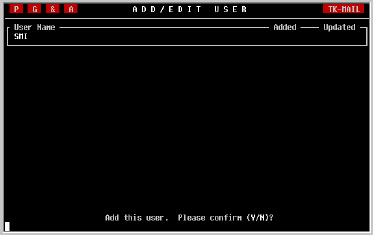
Whether you found and selected a user already in the TK-MAIL file, or you elected to add one, you will be brought to a screen, an example of which is provided below.
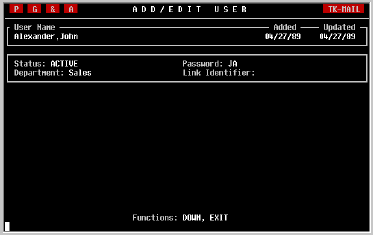
NOTE: TK-MAIL stores names in a LAST,FIRST format and no provision is made for suffixes such as MD, PHD or II. You may enter the name in a FIRST LAST format as long as you do not include a comma in it. The name will be automatically reversed when you press [RETURN].
However, if for any reason such as the user's departure, it becomes necessary to inactivate the user, simply type an [I] in this field.
Enter any alphanumeric password of up to ten characters in length and press [RETURN]. TK-MAIL will force uppercase. Should you enter a password which is already in use by another user, TK-MAIL will beep and not allow you to leave the field until an acceptible password has been entered.
It is a good idea to standardize your department names if you use this feature to make it easier for users to find the names of those to whom they wish to send mail.
If, during initialization of TK-MAIL, you entered the name of the link variable , then you must enter the value that variable will contain for this user here. This creates a cross-reference table with which TK-MAIL can relate the user identifier provided by your security system with the mailbox assigned to the user in TK-MAIL.